 MoveBoard
Every hourly quote takes its rate from the grid in Settings › Pricing & calculator › Rates. A row is a price level, a column is a crew and truck combination. The move date decides the row; the crew and trucks decide the column.
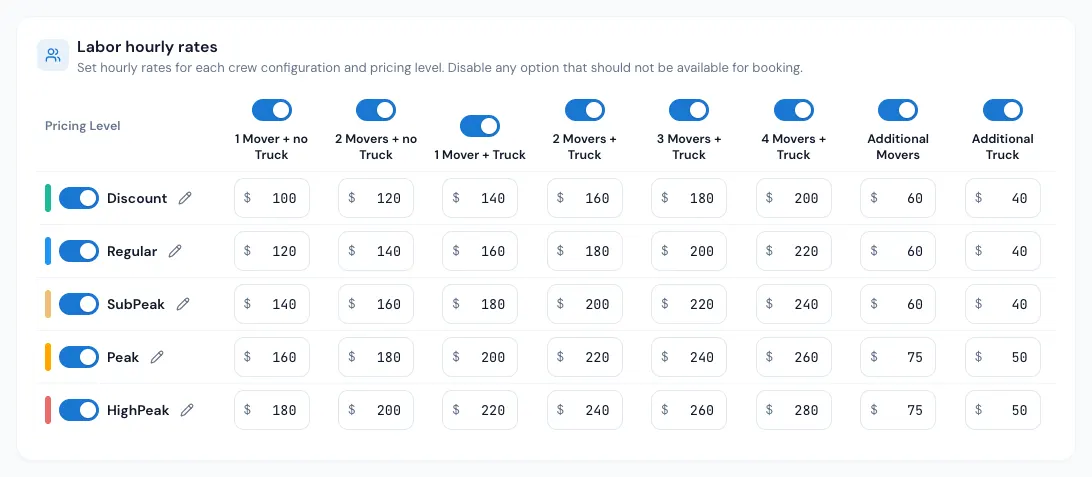
The five price levels
Discount, Regular, Sub-Peak, Peak and High-Peak, each with its own colour. A day is Regular unless you mark it otherwise on the price calendar.
- Press the pencil beside a level to give it your own name (for example "Summer"). The name shows on the price calendar and on the calendar your customers pick a date from.
- The switch beside a level takes it out of the price calendar's menu and the customer's calendar legend. Days already marked with that level keep pricing at its rates.
The columns
1 Mover + no Truck, 2 Movers + no Truck, 1 Mover + Truck, 2 Movers + Truck, 3 Movers + Truck, 4 Movers + Truck, Additional Movers and Additional Truck.
How bigger crews are priced:
- 5 or more movers: the 4 Movers + Truck rate plus Additional Movers for each mover past four.
- More than one truck: plus Additional Truck for each truck past the first.
- No truck and 3 or more movers: the 2 Movers + no Truck rate plus Additional Movers for each mover past two.
Example: 5 movers and 2 trucks on a Peak day, with Peak's 4 Movers + Truck at $200, Additional Movers $45 and Additional Truck $60: $200 + $45 + $60 = $305 an hour.
Travel rates
The Travel hourly rates grid prices the time on the road. With Same rates for travel time on, it follows the labor grid and can't be typed in. Switch it off to set travel rates of your own; the order window then shows a separate Travel Rate row.
Long-distance hourly (loading and unloading)
If you price long distance as Flat transportation + hourly loading and unloading (Settings › Long distance › Flat transportation + hourly), the loading and unloading can have their own hourly rates. The card Long-distance hourly (loading and unloading) is at the bottom of the Rates page, for each move type:
- Use the same hourly rates as local moves — ticked (the start for every company): long-distance loading and unloading are charged at the labor hourly rates above.
- Untick it to set a second, full chart for long distance: a row per price level and a column per crew, exactly like the labor grid. It starts as a copy of your labor rates; change what you need and press Save. The move date's price level on your price calendar picks the row, as for local moves.
The chart is used where Use the hourly rate table is ticked on the Flat transportation + hourly page. A rate typed on that page, or on the order, still wins. Orders already priced keep their rates until their addresses, size or long-distance price change. Copy to other move types copies this chart too.
Minimum hours at a fixed price
Many companies charge the minimum hours as one flat price, then their hourly rate — for example 3 movers and a truck: the first 3 hours $689, then $195 every additional hour. The Minimum hours price card, first on the Rates page, does that, for each move type. It is off until you switch it on (the switch on the right of the card): off, the card is one line and every move is charged by the hour, exactly as before. On, the card opens to its grid. Every box is empty until you fill one; an empty box means that crew is charged by the hour. Switching it off again keeps the prices you typed (switch it on and they are back) but nothing is charged with them while it is off.
- Switch the card on, then press Save — the switch is saved with the prices. Copy to other move types copies the switch too.
- The card has the same rows and columns as the labor grid: a price level per row (Discount … High-Peak), a crew per column. Type the price of the minimum hours in the box of each crew you charge this way — for example $689 under 3 Movers + Truck and $489 under 2 Movers + Truck in the Regular row. Fill Additional Movers / Additional Truck too if a bigger crew should get a fixed price as well (each one more adds that amount).
- How many hours the price covers is your minimum hours, where they are set today: Crew Size & Minimums › Minimum Billable Hours, a price-calendar day's own minimum, or the Minimum hours typed on an order. A move type with no minimum hours does not use the card.
- Under the grid, Customers see shows the exact words your quotes, documents and bills will use.
How the price is worked out:
- Up to the minimum hours (or exactly them): the fixed price. Past them: the fixed price plus every extra hour at the regular hourly rate, on your normal billing increments. Example: 4 h 30 m with 3 movers = $689 + 1.5 × $195 = $981.50.
- Travel time counts exactly as it counts toward your minimum hours today. With Include Travel Time in Minimum Hours on, the travel fills the fixed hours first (it is not charged on its own inside them): 30 minutes of travel + 2 hours of work = $689; 30 minutes + 4 hours = $689 + 1.5 × $195. With it off, travel is charged on its own, as always.
- A range estimate gets it on both ends; a move over several days gets it on each day, like the minimum. Overtime still applies to the hours past its threshold.
- Packing materials, extra services, fees, fuel, valuation, discounts and taxes stay exactly as they are — they work on the new labor total.
- An Hourly Rate typed on an order is the rate after the minimum hours. The fixed price follows the grid; to change it on one order, type over Minimum hours price on the Move card (it turns red; the arrow puts the grid's price back).
- New orders get the price when they are created; changing an order's crew, trucks or date re-prices it, the same way the hourly rate is. Booked jobs, bills of lading and closings keep the price they were quoted with. Filling the card does not re-price orders you already have.
Everywhere the hourly rate is shown, a day with a fixed price reads "First 3 hours: $689 (3 movers, 1 truck) · then $195 per hour" instead: the website quote result, the client portal, the order window (Move card and Quote card), estimates and Orders for Service, the bill of lading on the crew's phone and the office closing (its lines read Minimum 3 hours (fixed) $689.00 and Additional 1 h 30 m × $195.00 = $292.50), the Test calculator and the AI receptionist. Email, text and document templates can print it with ORDER_RATE_TERMS (the whole line) and ORDER_MINIMUM_HOURS_PRICE ($689.00); in a bill-of-lading or contract block, @laborRateTerms and @minimumHoursFixedPrice (blank on a day charged by the hour). ORDER_MINIMUM_HOURS then reads "3 h 00 min (fixed price $689.00)".
After-hours rate (jobs that start late)
Some companies charge more for a job that starts in the evening. The After-hours rate card on the Rates page does that, for each move type. It is off for every company until you switch it on; while it is off, the rate follows the move date only, as above.
- Use an after-hours rate — on: a job that starts at or after the time you set uses one price level's rates instead of the date's.
- Jobs that start at or after — the time, for example 5:00 PM. It is compared with the first time of the job's arrival window.
- Use the rates of — the price level, for example High-Peak. Both its labor and travel rates are used.
How it works:
- Only the start time counts. A job that starts at 4:00 PM and runs past 5:00 PM keeps its normal rate; a job that starts at 5:30 PM gets the after-hours rate.
- The after-hours level replaces the date's level, even on a Peak day. A Blocked day stays blocked. A job with no start time (TBD) is priced by its date.
- A rate typed on the order always stays.
- New orders get it when they are created. On an open order (not yet Reserved), changing the start time across your after-hours time re-prices the rate, the same way a new move date does; a new date or crew re-prices with the start time too. Reserved and booked orders keep their rates when only the start time moves, and bills of lading and closings keep what they were priced at. Switching the rule on does not re-price orders you already have.
- Copy to other move types copies the rule too.
Example: Regular is $120 an hour for 2 movers and a truck, High-Peak is $150, and the rule is "5:00 PM, High-Peak". A job starting at 5:30 PM is $150 an hour; one starting at 4:00 PM is $120, however late it finishes.
Change the rates
- Open Settings › Pricing & calculator › Rates.
- Pick the move type at the top (residential, commercial…).
- Type the new amounts.
- Optional: Copy to other move types fills the other types in with this one's grid.
- Press Save.
Nothing changes until you save. New quotes use the new rates right away.
On an order
The Hourly Rate row on the Move Details card shows the rate in force. Open it to type a different rate (and an expiry date for it); the typed rate shows in red with a ↺ that gives the calculated rate back. The Crew Size list shows what each crew size would cost an hour.
If something goes wrong
- "… is not a rate. Use a number that is not below zero." — a box holds something other than a plain number.
- "… an hour is more than a rate can be." — over $100,000; check for a stray zero.
- "A name can be 256 characters at most." — a level's name is too long.