 MoveBoard
 can add tax to a quote in two ways: a separate rate for each kind of charge, or one rate on the whole order. The Taxes row in Quote Details shows the total tax.
The five tax rates
| Rate | What it is charged on |
|---|---|
| Labor Hourly Tax | The labor charge of an hourly move |
| Travel Hourly Tax | The travel time charge of an hourly move |
| Long Distance Linehaul Tax | The linehaul of a long-distance move |
| Packing Materials Tax | The packing materials on the quote |
| Order Total Tax | Everything on the quote — moving charge, fuel, materials, services, fees and storage |
Order Total Tax is all or nothing: while it is above zero, the other four are greyed out and not charged. Set it to 0 to use the four separate rates.
Unless you turn on the two switches below, taxes are worked out before the discount comes off, and valuation is not taxed.
Tax the valuation, and tax after the discount
Two switches sit under Order Total Tax. Each move type has its own. Both are off until you turn them on, and both work only with an Order Total Tax. While Order Total Tax is 0 they are greyed out.
| Switch | Off (the default) | On |
|---|---|---|
| Tax the valuation | Valuation (Full Value Protection) is added after the tax and is not taxed | The valuation is taxed at the Order Total Tax rate too |
| Calculate tax after the discount | The tax is worked out on the charges before the discount comes off | The tax is worked out on the charges after the discount comes off |
For example, with a 13% Order Total Tax:
- Tax the valuation: a $520 move with $220 of Full Value Protection. - Off: $67.60 tax, $807.60 total. - On: $96.20 tax (13% of $740), $836.20 total.
- Calculate tax after the discount: $1,400 of charges with a $50 discount. - Off: $182.00 tax, $1,532.00 total. - On: $175.50 tax (13% of $1,350), $1,525.50 total.
The valuation is never discounted, so its tax is the same either way.
The quote, the customer's page, the Order for Service, the bill of lading, the closing, invoices, payments due and QuickBooks all use the same tax. When the valuation is taxed, the order and closing invoices list a Valuation Charge line, so the invoice adds up to the order's total.
Which orders change
Saving either switch updates:
- new quotes;
- open orders of that move type that the customer hasn't agreed to yet (for example New, Follow Up or Can Book Online). MoveBoard re-prices them within a few minutes, and each one's log says Repriced: Taxes settings changed.
Reserved, Booked and completed orders, and their bills of lading and closings, keep the totals they already have.
Set your rates
- Open Settings › Pricing & calculator › Taxes.
- Pick the move type at the top. Each move type has its own rates.
- Type each rate as a percent (8.25 means 8.25%).
- Turn on Tax the valuation or Calculate tax after the discount if you want them (see above).
- Press Save. Copy to other move types gives the other move types the same rates and switches; they are saved with the next Save.
New quotes use these rates. The two switches also reach open orders, as described above.
Change the tax on one order
- Open the order and click Taxes in Quote Details.
- Type a different rate in any row. Each row shows the tax it adds.
- Press Done, then SAVE on the order.
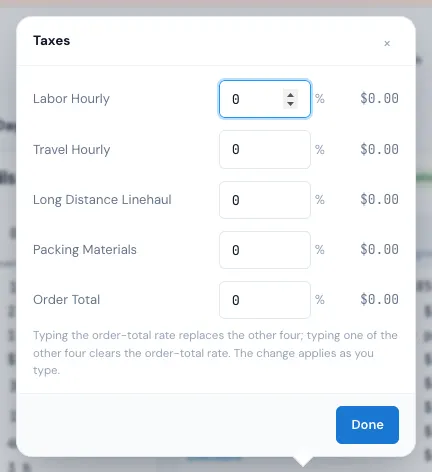
Typing the Order Total rate replaces the other four; typing one of the other four clears the Order Total rate. The quote follows as you type.